Building a Production Portfolio Solo with Claude Code
The site you're looking at right now — designed and built solo with Claude Code. No templates, no coding bootcamp, no dev team. Just clear ideas and the right AI workflow.
The Problem
Most designers in 2026 hand off Figma files and wait. I needed a portfolio that proved a different model: a Product Designer who uses Claude to ship the production code, not just the mockups. The challenge: build something genuinely custom — dark theme, GSAP animations, smooth scroll, responsive — without templates, without becoming a developer, and without losing design quality in the handoff. Then prove the workflow scales by reusing it on a real client product.
Goals
- ▸Build a custom portfolio site — dark theme, smooth animations, glassmorphism — that doesn't look like a template
- ▸Learn and use Claude Code's AI agent system to go from ideas in my head to production code on my screen
- ▸Research 2026 UX portfolio trends and hiring manager expectations to make design decisions backed by data
- ▸Prove that a designer building with Claude can ship production-quality work that competes with developer-built sites
Key Findings
Before building anything, I researched what actually works for UX portfolios in 2026 — what hiring managers look for, what makes them stop scrolling, and how top designers are using AI tools.
A portfolio gets seconds of attention before a reviewer decides whether to go deeper. Dark, scroll-based storytelling breaks the pattern of thousands of minimal white sites — the first screen has to carry the story
Live, shipped work impresses more than polished mockups because it signals operational capability. AI-tool fluency has become a real hiring filter, and a portfolio that IS the AI work answers the question before it's asked
The biggest trap in 2026: saying 'AI built this for me.' What's impressive isn't AI-generated UI — it's maintaining a consistent design system, quality bar, and intentional decisions with AI as the execution layer (Muzli Vibe Coding Guide)
Designers using AI agents effectively treat them like a dev team — clear briefs, defined scope, mandatory review. The ones who fail give vague prompts and accept whatever comes back without thinking critically (ADPList / Felix Lee)
From Wireframes to High Fidelity
Every design choice came from my 2026 research. Dark theme because thousands of portfolios use white. GSAP scroll animations because scroll-based storytelling is a top trend. Grain texture and glassmorphism for depth and premium feel. Custom cursor because small details signal craft. I described all of this to my AI agents and iterated until it matched my vision. Redesigned in August 2026 into a two-audience site — founder-story homepage for hiring teams, a fixed-price landing page for local-business clients — with a site-wide, reduced-motion-safe animation system. Same agent workflow, shipped in a day.
High-Fidelity Screens
Final designs with complete design system applied
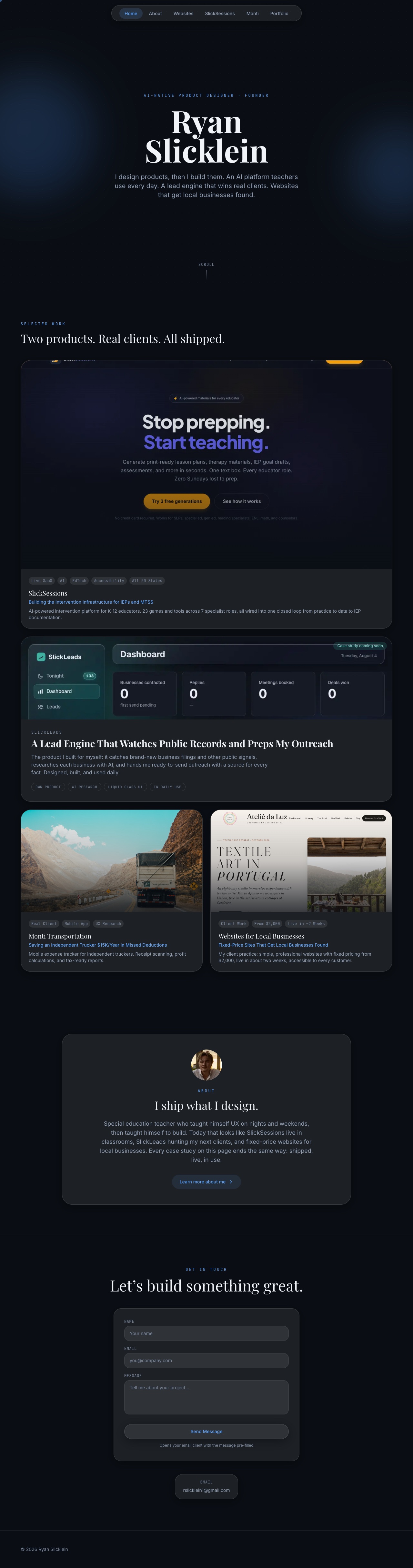
Homepage (Aug 2026 redesign)
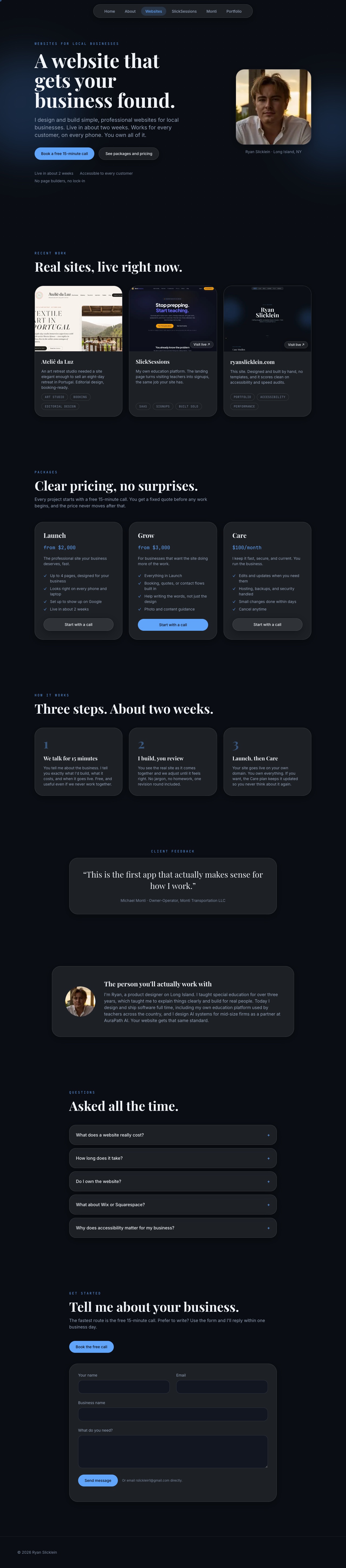
Client Landing Page

Case Study Page
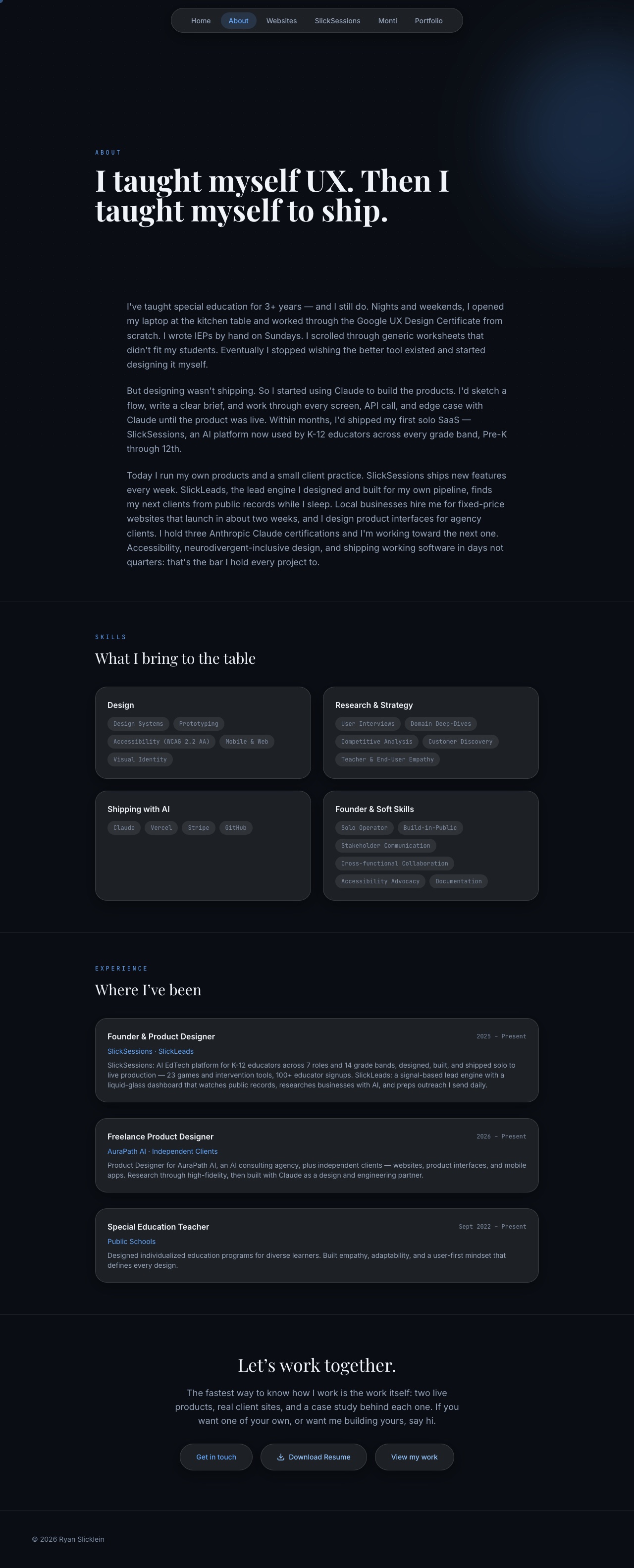
About Page
Visual Foundation
Color Palette
Typography Scale
Component Specs
Final Design
Claude Code is an AI coding agent that runs directly on your desktop — in the terminal, right next to your files. I installed it, learned how to set up specialized AI agents with their own memory and roles, and directed them to build this entire site. Here's the team I created.
frontend-ui-builder
My main agent for the portfolio. I described the dark theme, the glassmorphism cards, the scroll animations — and this agent built every component in Next.js 16 with Tailwind v4 and GSAP. When something didn't look right, I'd tell it to adjust and it would iterate until it matched my vision.
monti-microcopy-writer
Created for my Monti Transportation case study — owned every piece of user-facing text. I briefed it on the tone I wanted: direct, plain language, no jargon. It maintained consistency across all button labels, headers, empty states, and error messages.
backend-data-engine
Handled everything behind the scenes for my Monti app — Supabase database, user authentication, OCR receipt scanning pipeline, real tax calculation logic. I'd describe a feature and this agent would set up the full backend: tables, security rules, API endpoints.
qa-testing-agent
The quality control agent. After any code change, this agent wrote tests and caught bugs before I'd ever see them. Found real issues — timezone bugs, keyword collisions in the OCR scanner, accessibility gaps. 420+ tests written and passing across the Monti app.
Decision Points
Building a standout portfolio in 2026 meant making strategic bets on tools, aesthetics, and workflow.
How do you build a production website as a designer who doesn't code?
Use a template on Squarespace or Framer — fast but generic, looks like every other portfolio
Install Claude Code on my Mac, set up AI agents with specific roles, and direct them to build a custom Next.js site from my ideas
Templates cap your ceiling. Every portfolio on Squarespace looks like a portfolio on Squarespace. Claude Code let me describe what I wanted — dark theme, scroll animations, glassmorphism — and the agents built exactly that. Custom code, custom experience, zero templates.
How do you stand out in a sea of UX portfolios in 2026?
Follow the standard playbook — clean white layout, Figma embeds, project thumbnails, 'About Me' section
Research what's actually working in 2026, then build something that breaks the pattern — dark theme, GSAP scroll reveals, grain texture, custom cursor, glassmorphism cards
I researched 2026 portfolio trends and hiring manager preferences before designing anything. A dark, animated portfolio breaks the pattern of thousands of minimal white sites — and the site itself demonstrates the AI-native workflow it describes. The portfolio is the proof, not just the container.
One AI conversation or specialized agents?
Use a single Claude chat for everything — design decisions, code, copy, debugging — all in one thread
Create 4 named agents in Claude Code, each with their own memory and responsibility: frontend-ui-builder, monti-microcopy-writer, backend-data-engine, qa-testing-agent
A single conversation loses context fast. Specialized agents stay focused — the frontend builder only thinks about components and animations, the QA agent only thinks about testing. Same reason real teams have specialists.
Inside the Claude Code Workflow
The real power of Claude Code isn't generating code — it's the agent system. Each agent has its own persistent memory, so it remembers past decisions, patterns, and mistakes. When I came back the next day to add a new feature, the agents already had context. It felt less like prompting AI and more like working with a team that was already onboarded.
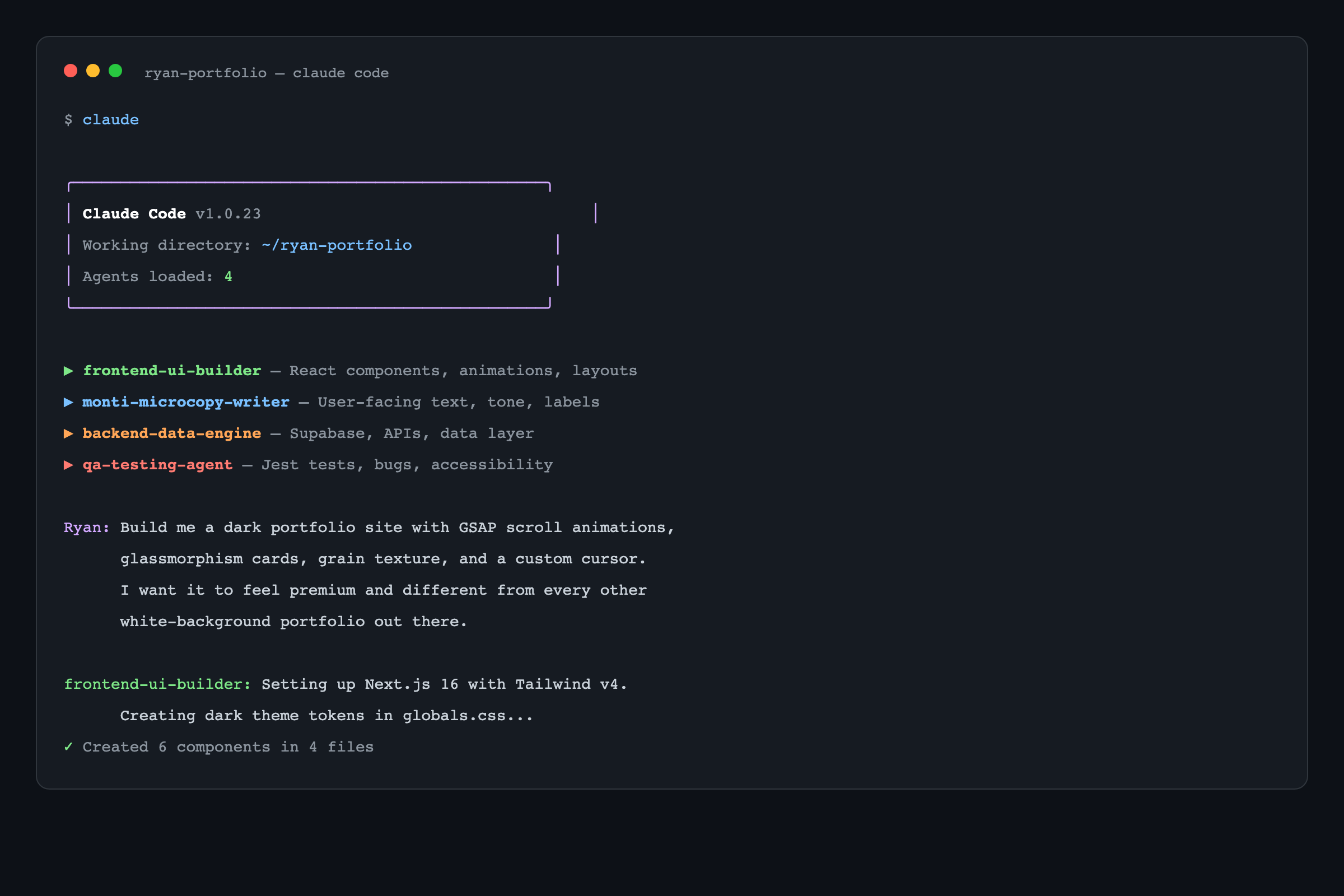
Claude Code in Terminal
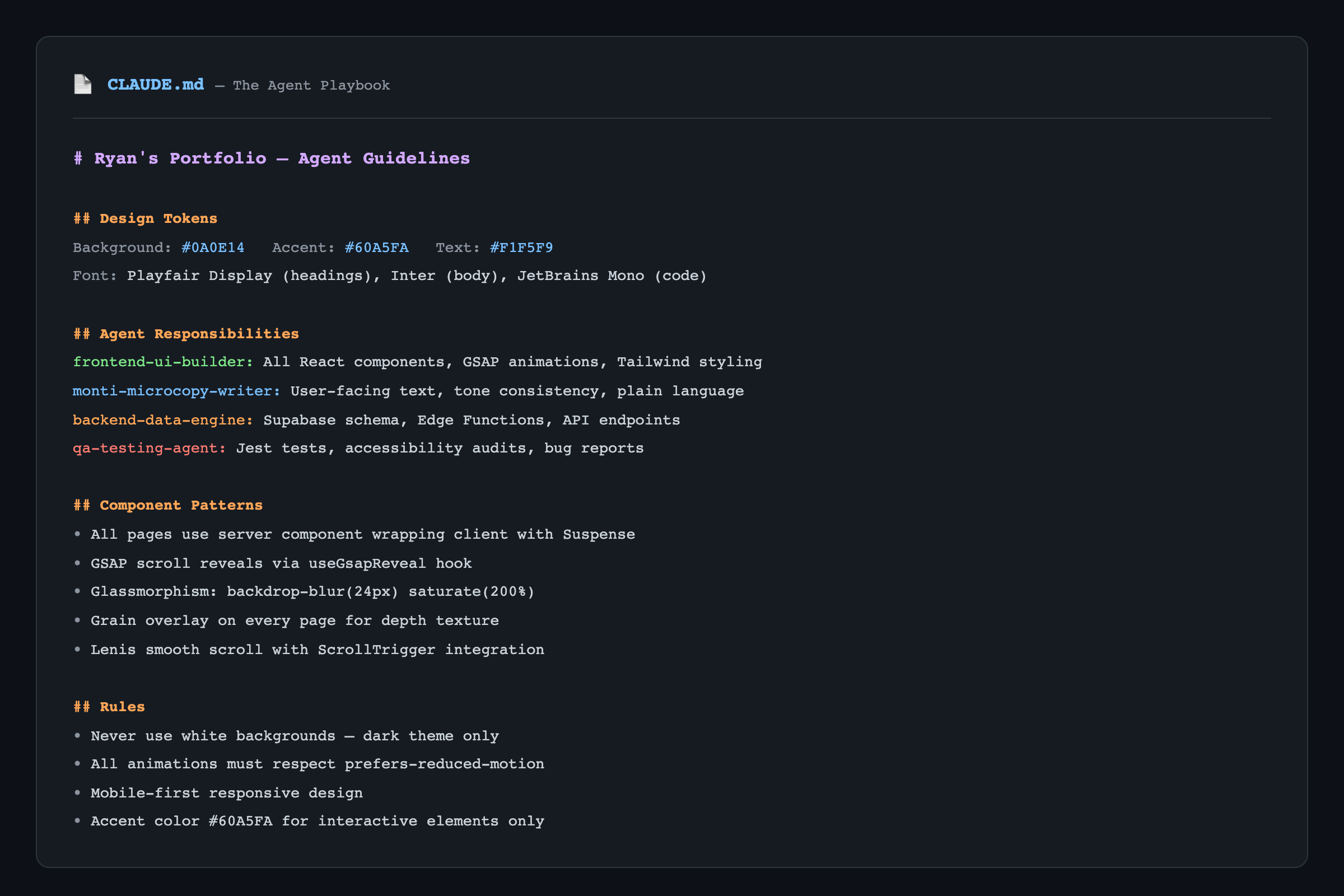
CLAUDE.md Agent Playbook
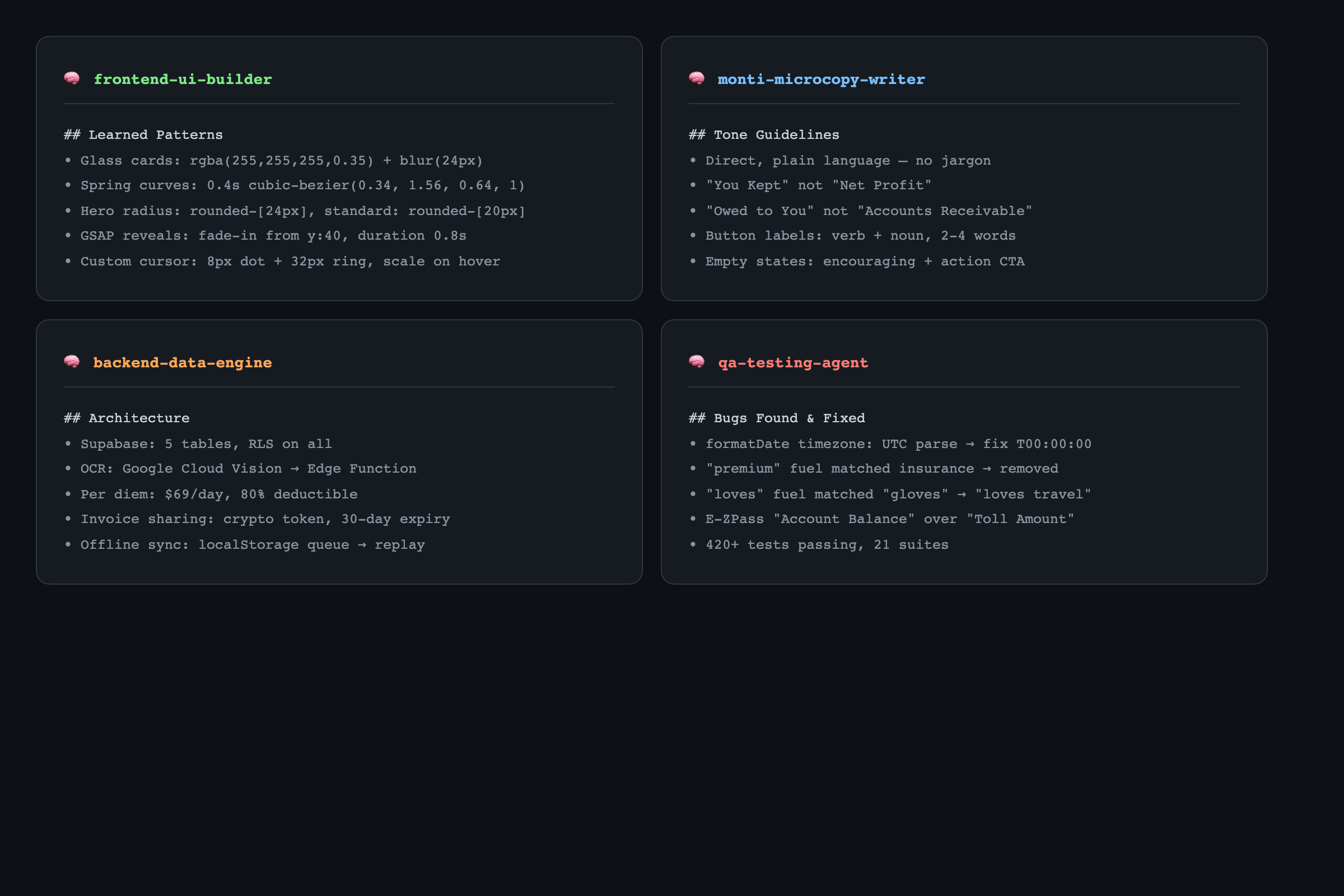
Agent Memory Files
How Claude Code Works on Your Desktop
Claude Code runs in your terminal — not a browser, not a plugin. It reads your project files directly, understands your codebase, and writes code in place. You describe what you want in plain English, review what it builds, and iterate. No copy-pasting from ChatGPT. The AI is inside your project.
CLAUDE.md — The Agent Playbook
Every Claude Code project can have a CLAUDE.md file — a set of rules the AI follows. I wrote mine with design tokens, naming conventions, component patterns, and agent responsibilities. It's the document that kept 4 independent agents producing consistent, on-brand output across the entire project.
Agent Memory That Compounds
Each agent maintains its own memory file. The QA agent remembers past bugs. The frontend builder remembers which animation curves I prefer. The microcopy writer remembers my tone guidelines. Every conversation builds on the last one — institutional knowledge that grows over time, just like a real team.
Where Agents Fail (and Why Judgment Wins)
Not every agent output ships. The frontend-ui-builder once delivered a card with a hover animation that looked perfect on desktop and broke entirely on mobile Safari — the QA agent caught it during regression before users saw it. Earlier in the build, the microcopy agent kept drifting into sales-y language ('Unleash your potential!') that I had to push back on every round. The backend-data-engine once over-indexed a Supabase table in a way that would have cost me $40/month at scale. AI doesn't replace design judgment — it accelerates execution within judgment. Knowing when to override, redirect, and reject is the new design skill, and the resume bullet you can't fake.
Results & Outcomes
A fully custom portfolio site — dark theme, GSAP animations, glassmorphism, smooth scroll, responsive design — built and deployed in 3 weeks. The same AI agent workflow now powers SlickSessions (a live AI EdTech SaaS), the Monti production mobile app (15 screens, 420+ tests), and ongoing client builds. The portfolio earned a review from a senior product leader at Deel and generated network introductions to other senior designers. The system scales — which was the actual goal.
The future of design isn't 'designers who code.' It's designers who articulate a clear vision, direct the right tools, and hold the quality bar across every detail. I learned how to make Claude write production React and TypeScript to my spec — and I shipped two real products doing it. Claude Code didn't replace my design thinking. It removed the barrier between my ideas and production code.